Building Scalable Microservices with Node.js and Docker
A deep dive into architecting microservices that handle millions of requests, covering container orchestration patterns, service mesh considerations, and performance benchmarking.
Cloud-native architectures demand a fundamentally different approach to designing backend systems. In this post, we break down the key patterns behind scalable microservices using Node.js and Docker.
Architecture Overview
Below is the high-level service communication flow we’ll be working with throughout this post:
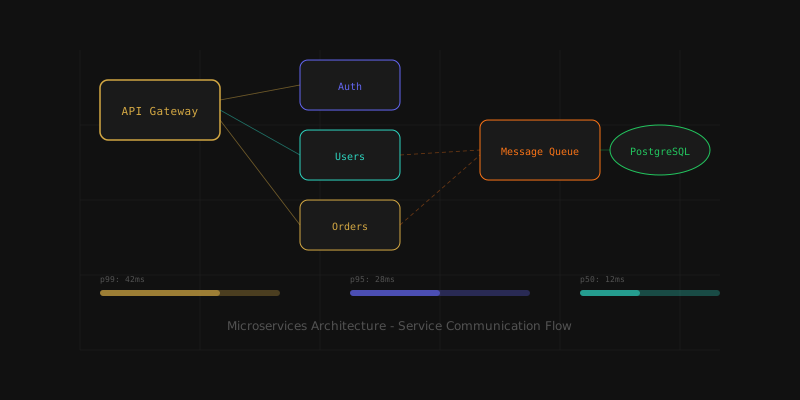
The architecture follows the API Gateway pattern - a single entry point that routes requests to the appropriate service.
Container Orchestration Patterns
When deploying to production, container orchestration becomes essential. We use Kubernetes with custom health-check probes:
import express from "express";

const app = express();

app.get("/health", (req, res) => {
  const uptime = process.uptime();
  const memory = process.memoryUsage();

  res.json({
    status: "healthy",
    uptime: Math.floor(uptime),
    memory: {
      heapUsed: `${Math.round(memory.heapUsed / 1024 / 1024)}MB`,
      rss: `${Math.round(memory.rss / 1024 / 1024)}MB`,
    },
  });
});

app.listen(3000);
Docker Compose for Local Development
For local development, we replicate the production topology using Docker Compose:
version: "3.8"
services:
  api-gateway:
    build: ./gateway
    ports:
      - "3000:3000"
    depends_on:
      - auth
      - users

  auth:
    build: ./services/auth
    environment:
      - JWT_SECRET=${JWT_SECRET}
      - DB_URL=postgres://db:5432/auth

  users:
    build: ./services/users
    environment:
      - DB_URL=postgres://db:5432/users
Service Mesh Considerations
A service mesh like Istio adds critical observability without touching application code. Key benefits include:
- Automatic mTLS between services
- Circuit breaking to prevent cascade failures
- Distributed tracing via OpenTelemetry
Error Handling Middleware
Every service needs robust error handling. Here’s our standardized approach:
interface AppError {
  statusCode: number;
  message: string;
  code: string;
}

function errorHandler(
  err: AppError,
  req: express.Request,
  res: express.Response,
  next: express.NextFunction
) {
  const status = err.statusCode || 500;
  const code = err.code || "INTERNAL_ERROR";

  // Log to structured logging pipeline
  logger.error({
    code,
    message: err.message,
    path: req.path,
    method: req.method,
    traceId: req.headers["x-trace-id"],
  });

  res.status(status).json({ error: { code, message: err.message } });
}
Performance Benchmarking
Using k6, we achieved 12,000 RPS with p99 latency under 45ms on a 3-node cluster:
import http from "k6/http";
import { check } from "k6";

export const options = {
  stages: [
    { duration: "30s", target: 200 },
    { duration: "1m", target: 500 },
    { duration: "30s", target: 0 },
  ],
};

export default function () {
  const res = http.get("http://api.internal/v1/status");
  check(res, { "status is 200": (r) => r.status === 200 });
}
Tuning Tips
Here are some quick wins for Node.js performance:
Connection Pooling
Always use connection pooling for your database connections. The default pg driver creates a new connection per query - use pg-pool instead.
Memory Management
Monitor your V8 heap size. Set --max-old-space-size based on your container’s memory limit.
Video: Deployment Demo
For a visual walkthrough of the deployment pipeline, here’s a quick demo:
Ref
The key takeaway: measure first, optimize second. Profile your actual bottleneck before making architectural decisions.